
Micro-Learning E-Learning App
An e-learning platform with short video lessons, offline downloads, quizzes and certificates, giving learners a mobile-first way to build skills and trainers a clear view of progress.
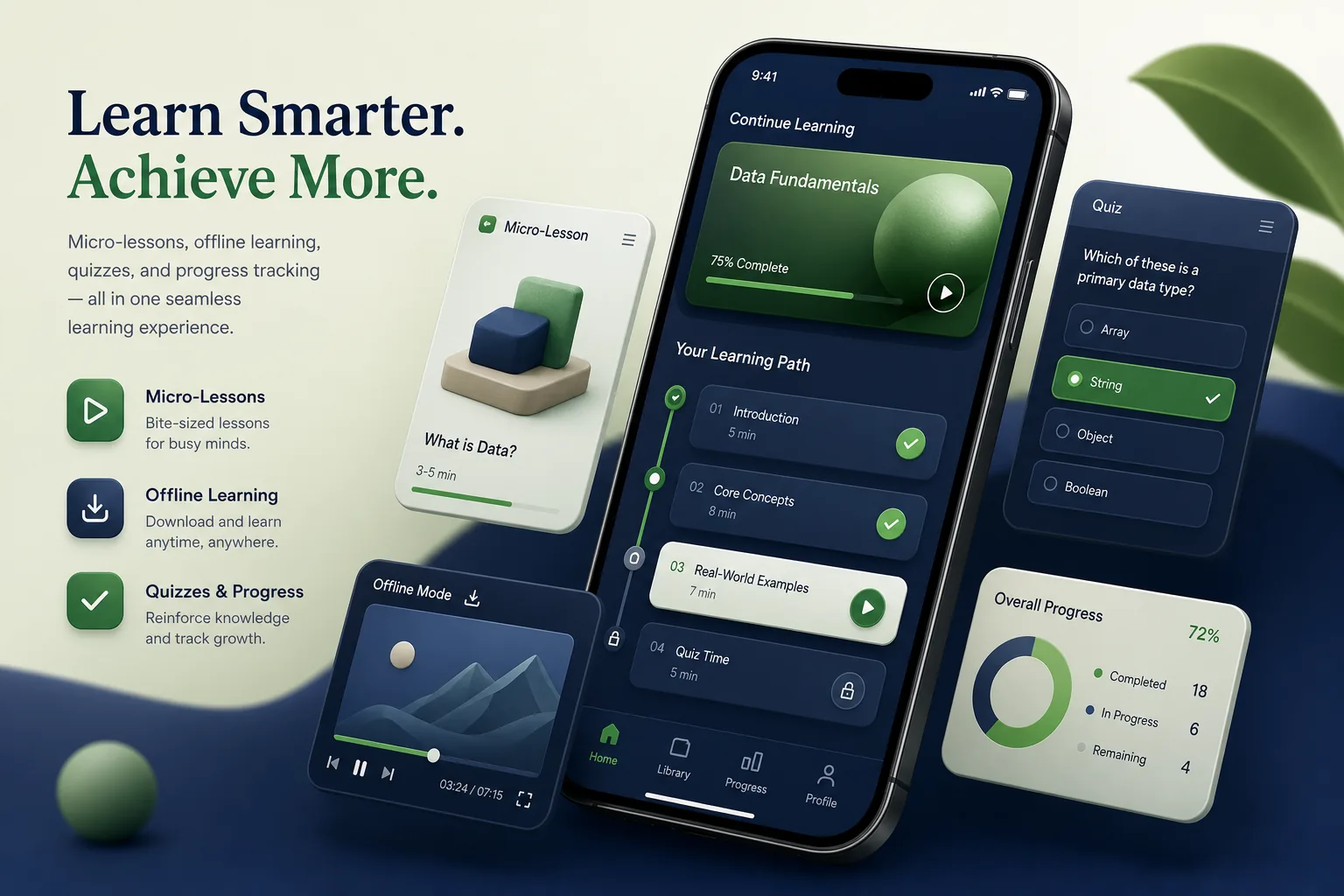
Project overview
We built an e-learning platform for a training provider that sells skills courses to individuals and to companies training their teams. Learners follow short video lessons and quizzes on their phones, download content for offline study and earn certificates; trainers and company administrators track progress from a web portal.
The engagement covered course structure design, React Native apps, a Node.js platform, video delivery, assessments and the admin portal. It is part of our education app development work for training companies, schools and edtech brands.
The client and the challenge
The provider's courses were long recorded webinars on a desktop learning management system. Many learners studied on phones during commutes and shift breaks, with patchy data, and rarely finished hour-long sessions. Completion data was limited to whether a video had been opened, so the provider could not tell which topics learners struggled with.
Corporate clients wanted to assign courses to their staff and see completion and quiz results, while the provider needed to protect paid video content and publish new courses without developer involvement. Existing learners and course history also had to move to the new platform without losing progress or certificates already earned.
Solution architecture & delivery
Together with the provider's instructional designers, we restructured courses into modules of short lessons, each ending in a few questions. The React Native app presents a daily learning path, resumes exactly where the learner stopped and adapts the next suggestion to quiz results.
Videos are transcoded into several quality levels and streamed adaptively from cloud storage through a content delivery network. For offline study, learners download a module; files are encrypted and stored in the app's private storage, linked to the learner's licence, and removed when access expires. Progress and quiz answers made offline are queued and synced to the Node.js API when the device reconnects, with timestamps so the latest attempt is kept. Download size is shown before saving, learners can choose quality to preserve storage, and downloads can be limited to Wi-Fi.
Assessments support multiple choice, ordering and scenario questions with explanations. Question banks let each attempt draw different questions, and passing a final assessment generates a certificate with a verification link that employers can check. Question-level results feed a report that shows trainers which topics cause the most wrong answers, guiding which lessons to revise.
The web portal serves three roles. Content editors upload videos and build courses; company administrators invite staff, assign courses with due dates and export reports; the provider's team manages licences and payments for individual learners. Organisation data is separated so each company sees only its own staff. Single sign-on is available for corporate clients, so staff join with their work accounts and leave automatically when their access is removed.
Key features we built
- Short video lessons organised into modules and learning paths
- Adaptive streaming and encrypted offline downloads
- Quizzes with question banks, explanations and final assessments
- Certificates with online verification links
- Resume playback, bookmarks and notes across devices
- Reminders and nudges for assigned courses and due dates
- Company admin portal for invitations, assignments and progress reports
- Course builder for editors plus licences and payments for individual learners
How we delivered it
- Discovery. Workshops with instructional designers, learners and corporate clients to define course structure, reporting needs and licensing rules.
- Content and UX design. Converting a pilot course into micro-lessons and testing the mobile learning path with learners on mid-range phones. Instructional designers used the pilot to set a consistent lesson template, making later course conversion faster to plan.
- Build. Two-week sprints delivering the apps, video pipeline, assessments and portal, following our CI/CD and testing pipeline.
- Pilot. A pilot with a corporate client's team to refine assignment workflows, offline sync and report exports.
- Migration and support. Migrating the remaining course library and learner accounts from the old system, then ongoing releases and support. Legacy certificates were imported with their original dates and remain verifiable.
Technology choices
- React Native — one codebase for iOS and Android with native video playback, background downloads and secure local storage. The same components render lessons on phones and tablets.
- Node.js — an API for courses, progress sync, assessments and reporting, plus background jobs for transcoding and certificates.
Outcomes
- Learners study in short sessions on their phones, including offline, instead of sitting through long webinars
- Corporate clients assign courses and track completion without asking the provider for manual reports
- Paid video content is protected with licence-linked, encrypted downloads
- Content editors publish and update courses through the portal without developer help
- Certificates can be verified online by employers
- Trainers see which topics learners find hardest and revise lessons based on question-level results
FAQ
How does offline video work in the e-learning app?
Learners download a module, which is stored encrypted in the app's private storage and tied to their licence. Progress and quiz answers made offline sync to the server when the device reconnects. If a licence is renewed, downloads remain valid without being fetched again.
Can companies manage their own learners?
Yes. Company administrators invite staff, assign courses with due dates and export progress reports, and each organisation sees only its own learners. Administrators can also bulk-invite staff from a spreadsheet and send reminders to anyone behind on an assigned course.
How does this compare with a full web LMS?
This platform is mobile-first; our web LMS platform covers desktop-centred course delivery, and our language learning app adds speech practice. The education industry page shows more. Many clients start with this app and add web access later.
How much does it cost to build an e-learning app?
Costs depend on video features, assessments, corporate reporting and content migration. Our app development cost calculator gives an indicative range, and we refine it after discovery.
Micro-Learning E-Learning App screens
Build your next education product with Next Olive
Share your requirements — we will propose scope, timeline and stack within one business day.