Olive Remote Desk: Secure Remote Desktop Software for Modern Businesses
Remote work has changed the way businesses operate.
Employees no longer work exclusively from a single office computer. IT teams support users from different locations, developers work with remote environments, businesses operate across multiple offices, and teams need reliable access to computers and systems from almost anywhere.
That makes remote desktop software an increasingly important part of modern business infrastructure.
At Next Olive Technologies, we have been building web applications, mobile products, SaaS platforms and desktop software for businesses and startups. Our experience building technology for distributed teams led us to develop Olive Remote Desk, a remote access solution designed around a simple idea:
Secure remote access should be simple enough for everyday users and flexible enough for modern businesses.
With Olive Remote Desk, users can connect to remote computers, provide technical assistance, work with remote devices and access their digital workspace without needing to be physically present in front of the computer.

What Is Olive Remote Desk?
Olive Remote Desk is a remote desktop and remote access application developed by Next Olive Technologies.
It is designed to help individuals, IT professionals, support teams, developers and businesses access computers remotely.
Instead of physically sitting in front of a computer, a user can establish a remote connection and interact with the remote machine.
Typical use cases include:
- Accessing an office computer from home
- Providing remote IT support
- Troubleshooting employee computers
- Supporting customers remotely
- Accessing development machines
- Working with remote servers and workstations
- Supporting distributed teams
- Accessing files and applications on another computer
The product is designed around a straightforward user experience where a remote device can be identified using a Remote Desk ID, with authentication and connection controls available as required.
Why Remote Desktop Software Matters in 2026
Businesses have become increasingly distributed.
An employee might work from home today, from an office tomorrow and from another city the following week. IT teams may support customers across different countries, while development teams can work with machines and environments located in different offices or data centers.
Traditional physical access simply doesn’t work well in these situations.
Remote desktop technology helps organizations bridge that gap.

A well-designed remote access solution can help businesses:
- Reduce unnecessary travel
- Resolve technical problems faster
- Support employees remotely
- Access office computers outside working hours
- Maintain distributed development environments
- Improve IT support workflows
- Enable flexible working arrangements
However, remote access is not only about connectivity.
Security, authentication, privacy, performance and ease of use are equally important.
That’s where Olive Remote Desk is designed to fit.
Key Features of Olive Remote Desk
1. Simple Remote Computer Access
Remote access shouldn’t require a complicated technical setup for every connection.
Olive Remote Desk uses a straightforward device identification and connection workflow.
Users can provide their Remote Desk ID to an authorized person, who can then initiate a connection.
This approach makes the software suitable for:
- Individuals
- Small businesses
- IT support teams
- Developers
- Remote employees
- Technical consultants
The goal is simple:
Find the computer, authenticate the connection and get to work.
2. Secure Remote Connections
Security is one of the most important considerations when selecting remote desktop software.
Remote connections can potentially provide access to an entire computer, which means authentication and secure communication need to be treated as fundamental parts of the product.
Olive Remote Desk is designed around secure communication using modern web-based connectivity technologies.
The current product positioning includes WebRTC-based peer-to-peer and encrypted communication, with self-hosted infrastructure options being part of the architecture.
Businesses should always configure authentication, permissions and infrastructure according to their specific security requirements.
3. Peer-to-Peer Connectivity
One of the important concepts behind Olive Remote Desk is peer-to-peer connectivity.
Where network conditions allow it, peer-to-peer communication can help devices communicate directly rather than routing all remote-session traffic through a central application server.
This can potentially provide benefits such as:
- Lower latency
- More direct communication
- Better responsiveness
- Reduced dependency on centralized traffic routing
WebRTC provides the underlying communication capabilities for real-time peer-to-peer connections.
This makes it particularly relevant for applications involving remote desktop sessions, audio, video and real-time collaboration.
4. Self-Hosted Remote Access
For businesses that want more control over their infrastructure, self-hosted remote desktop software can be an important consideration.
Instead of relying entirely on a third-party hosted environment, organizations can deploy supporting infrastructure within an environment they control, depending on their architecture and requirements.
Self-hosting can be attractive for:
- IT departments
- Enterprises
- Technology companies
- Organizations with infrastructure requirements
- Businesses concerned about data control
- Private development environments
It also gives technical teams greater control over deployment, monitoring and infrastructure configuration.
Remote Desktop for IT Support
One of the most practical applications of Olive Remote Desk is remote IT support.
Consider a common situation.
An employee contacts the IT team:
“My application isn’t working.”
Normally, an IT technician may need to visit the employee’s desk or attempt to troubleshoot the problem through a phone call.
With remote access software, the process can become much simpler.
A typical workflow
Step 1: Employee provides the Remote Desk ID.
Step 2: Support technician enters the ID.
Step 3: The connection is authenticated.
Step 4: The technician connects to the remote computer.
Step 5: The issue is diagnosed.
Step 6: The technician helps resolve the problem.
This can significantly reduce the time required to diagnose many desktop-related problems.
Remote Desktop for Distributed Teams
Remote work has created another important use case.
A company may have employees working from:
- Home
- Multiple offices
- Co-working spaces
- Different cities
- Different countries
But important applications or development environments may still exist on office computers.
Remote access allows employees to connect to authorized machines when needed.
For example:
A developer working from home can connect to a development workstation located in the office.
Or:
An employee traveling for business can access their office computer without physically returning to the workplace.
This makes remote desktop software a useful component of a broader remote work technology stack.
Remote Desktop for Developers
Software development teams often work with multiple computers, development servers and testing environments.
A developer may need access to:
- Development machines
- Testing environments
- Build systems
- Internal applications
- Office workstations
- Remote servers
Instead of physically moving between machines, remote access provides another way to work with those environments.
For development teams, responsiveness is particularly important.
A remote desktop connection that feels slow can negatively affect productivity, which is why network conditions, connection architecture and application performance matter significantly.
Remote Access for Customer Support
Customer support is another area where remote desktop software can be useful.
For technical products, explaining a problem over the phone or through chat isn’t always enough.
A support engineer may need to see what is happening on the customer’s computer.
With appropriate authorization, remote access can allow the support team to:
- Inspect the environment
- Identify configuration problems
- Demonstrate solutions
- Troubleshoot application issues
- Assist users directly
This can reduce back-and-forth communication and potentially shorten resolution times.
Remote Desktop vs Traditional Remote Support
Traditional support often looks like this:
Customer → Phone → Explanation → Screenshots → Instructions → More troubleshooting
Remote support can become:
Customer → Authorization → Remote connection → Diagnosis → Resolution
The difference becomes particularly valuable when the problem is difficult to describe.
A remote desktop solution doesn’t replace good support processes, but it can give support teams another powerful tool.
Designed for More Than Remote Access
One of the larger ideas behind Olive Remote Desk is that remote access can become part of a broader digital workplace.
Modern teams need more than simply connecting to computers.
They also need:
- Communication
- Collaboration
- Meetings
- Project management
- Task management
- File sharing
- Time tracking
- Work reporting
This is why the product direction at Next Olive is moving toward a broader workspace experience.
The future vision is not simply:
Connect to a computer.
It is:
Connect people, devices and work.
From RemoteDesk to a Broader Virtual Workspace
The original RemoteDesk concept started around remote computer access.
As the product evolved, the opportunity became much larger.
A modern distributed team could use a single workspace to:
Chat → Meet → Manage Projects → Track Tasks → Access Devices → Track Work
This creates an interesting bridge between traditional remote desktop software and modern collaboration platforms.
The goal is to make remote work more connected rather than requiring employees to switch between multiple applications for every part of their day.
Work Tracking and Timesheets
For organizations that work on projects or bill clients by time, another important capability is work tracking.
A future-oriented remote workspace can allow employees to:
- Start a work timer
- Select a project
- Select a task
- Track working sessions
- Maintain a work diary
- Review timesheets
- Report project hours
For agencies, software development companies, consultants and IT service providers, this can connect everyday work with project accounting.
For example:
Client: ABC Corporation
Project: Mobile Application
Employee: Developer
Tracked: 32 hours
Hourly Rate: $30
The result can become a much more structured basis for timesheets and client billing.
Who Can Use Olive Remote Desk?
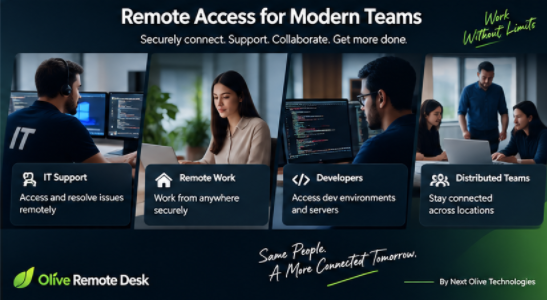
Olive Remote Desk can be relevant to a wide range of users.
IT Support Teams
Provide remote technical assistance without requiring a technician to be physically present.
Software Development Teams
Access authorized development computers and remote environments.
Small Businesses
Allow employees to access office systems while working remotely.
Enterprises
Support distributed teams and remote infrastructure.
Freelancers and Consultants
Access client-approved environments and provide technical assistance remotely.
Remote Employees
Connect to authorized workplace computers from different locations.
Managed IT Providers
Use remote access as part of technical support workflows.
What Makes a Good Remote Desktop Solution?
Choosing remote desktop software shouldn’t be based solely on whether you can connect to another computer.
Businesses should evaluate several factors.
Security
How are connections authenticated and protected?
Performance
Does the connection remain responsive under realistic network conditions?
Ease of Use
Can non-technical users understand the connection process?
Device Support
Does it work with the platforms your team actually uses?
Administration
Can organizations manage users, devices and permissions effectively?
Infrastructure Control
Does the solution provide deployment options suitable for your organization?
Scalability
Can the platform grow as your team and number of devices increase?
These considerations become increasingly important as remote access moves from being an occasional IT tool to an everyday business capability.
Olive Remote Desk and Next Olive Technologies
Olive Remote Desk is part of the broader product and engineering work at Next Olive Technologies.
Next Olive works with startups and growing businesses on web applications, mobile applications, SaaS platforms, AI solutions and custom software. The company’s portfolio spans multiple technology categories, including desktop applications and SaaS products.
The company’s broader development services include mobile app development, custom software development and product development.
That experience provides the foundation for building products such as Olive Remote Desk while also helping businesses develop their own custom digital platforms.
Explore Next Olive Technologies
Why Next Olive Built Olive Remote Desk
At Next Olive, we work with businesses that increasingly operate across locations, devices and distributed teams.
That creates a recurring challenge:
How do you keep people connected to their work when they aren’t physically in the same place?
Olive Remote Desk is one answer to that challenge.
But our longer-term vision goes beyond remote access.
We want to create technology that helps organizations:
Connect their people. Connect their devices. Connect their work.
That’s the thinking behind the evolution of Olive Remote Desk.
The Future of Remote Work
Remote work is no longer simply a temporary alternative to office work.
For many businesses, distributed work has become part of their permanent operating model.
That means the technology supporting remote teams also needs to evolve.
The next generation of remote-work platforms will likely combine multiple capabilities:
Remote Access
Communication
Video Meetings
Project Management
Time Tracking
Business Administration
The result is a more complete digital workspace.
Olive Remote Desk is being developed with this broader direction in mind.
Get Started With Olive Remote Desk
If you are looking for a remote desktop application, remote support solution or technology for distributed teams, you can explore Olive Remote Desk online.
For organizations looking to build their own remote access platform, SaaS product, desktop application or custom business software, Next Olive can also help with product discovery, design, development and ongoing engineering.
Talk to Next Olive about your software project
Frequently Asked Questions
What is Olive Remote Desk?
Olive Remote Desk is a remote desktop and remote access application developed by Next Olive Technologies for connecting to authorized computers remotely.
What is remote desktop software?
Remote desktop software allows a user to access and interact with another computer over a network as though they were using it directly.
Is Olive Remote Desk suitable for businesses?
Yes. Remote desktop technology can be useful for IT support, distributed teams, developers, consultants and businesses that need authorized remote access to computers.
Can remote desktop software be used for IT support?
Yes. Remote support is one of the most common applications of remote desktop technology because technicians can troubleshoot authorized computers without being physically present.
What is self-hosted remote desktop software?
A self-hosted remote desktop solution allows an organization to deploy supporting infrastructure within an environment it controls, depending on the product architecture and deployment model.
Is remote desktop secure?
Security depends on the application’s architecture, authentication, encryption, permissions, infrastructure and how the organization configures and uses it. Businesses should evaluate these factors before deploying remote access technology.
Can remote desktop software support remote employees?
Yes. Employees can use authorized remote access to connect to workplace computers from home or other locations, subject to company policies and permissions.
Conclusion
Remote work has changed what businesses expect from their technology.
A modern employee may need access to a workplace computer, a development environment, a customer system or an internal application without being physically present in the office.
Remote desktop software makes that possible.
Olive Remote Desk is Next Olive’s approach to making remote access more straightforward while providing a foundation for broader remote-work and collaboration capabilities.
From remote IT support to distributed development teams, from accessing office computers to building a connected digital workplace, remote access is becoming an important part of modern business infrastructure.
And for Next Olive, Olive Remote Desk represents more than another software product.